Showing posts with label Andriod. Show all posts
Showing posts with label Andriod. Show all posts
Saturday, 30 August 2014
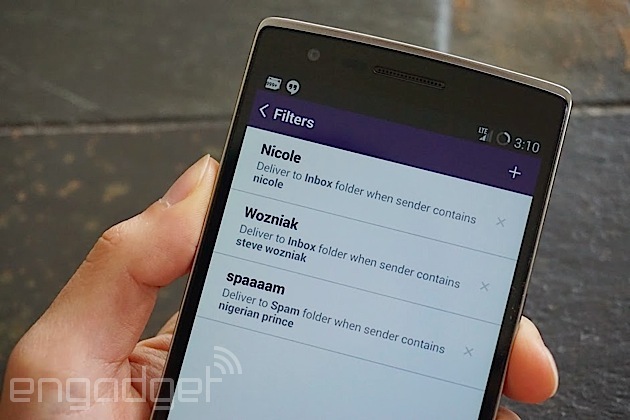
Yahoo Mail for Android now lets you filter emails while on the move


Friday, 27 June 2014
Android L vs. iOS 8: Can Apple take on Android’s biggest update ever?

We all thought Android 4.4 KitKat was a major change when it came out late last year, but the still unnamed L release of Android puts that to shame. Despite not telling us the codename (Lollipop?) or the version number (5.0?), Google demoed an updated UI called Material Design and a plethora of new features. You won’t be able to get your hands on the final version of L until this fall, but Apple is going to have its work cut out for it competing with the new Android, even after its lauded iOS 8 announcement. Here’s how Android is evolving and what that means for the iOS vs. Android matchup coming later this year.
Material Design
Material Design is the name of Google’s new interface guidelines — much like Microsoft and Metro — and it’s a radical departure from Android of the past. It adopts the color palette from Google Now with blues, muted greens, and red, but white is still the dominant color. It provides a more lively tapestry on which to paint the updated Android interface.
Android is still adhering to flat design, which is the trend, but it’s layered flatness. Google describes this as a take on stacks of paper, but a digital paper that can shift and morph into different shapes. The new SDK will allow developers to describe the way UI elements are layered (an elevation value), which can be used to render parts of an app as if they are floating just above another. Android L renders subtle shadows on the edges that give a feeling of depth without cluttering the screen. Every little change in the new Android UI also comes with some sort of animation, even if it’s fast. Ideally, there won’t be any more hard transitions.
How does this compare to Apple? Cupertino has taken a lot of heat for its iOS 7 redesign, but it’s slowly winning people over. iOS 8 continues the trend of flat design with the transparent glass effect. Design is a pretty subjective thing, but you have to admit Google is doing some very interesting things with Material Design.
Performance
Apple made a big fuss about the new Metal graphics API included in iOS 8, which will allow developers to design games that run considerably faster. The Swift programming language was also rolled out for iOS devs to create more streamlined apps. It all adds up to faster apps. Android response? A new runtime and the Android Extension Pack (AEP).

Google developed the AEP in partnership with Nvidia. It was demoed on the Nvidia Tegra K1 at I/O, but it should run on all ARM chips. AEP is a collection of extensions for OpenGL ES that adds features like tessellation and compute shaders that close the gap betweenmobile graphics and DirectX 11 on PCs. Google didn’t list any performance numbers, but Mountain View has another trick up its sleeve in this department.
Android L is the end of the line for Dalvik, the virtual machine in Android that compiles Java from apps into native code. Dalvik is what’s called a “just in time” compiler — you run an app, and it compiles the code as you go. The replacement for Dalvik was included in KitKat as a beta feature — the Android Runtime or ART. A device using ART compiles Java into native code upon installation and caches it, which makes all apps and games faster, piping the bits right to the hardware. Apple’s famous responsiveness advantage might be going away.
Power saving
In all these years, Google has neglected to create a basic battery saving mode for Android. A number of OEMs have done it on their own, like Samsung with its Ultra Power Saver Mode on the Galaxy S5. However, Android L is going to have Project Volta. This is a major change to the way Android manages battery life.
Project Volta will include an easy-to-use setting that users can flip on to down-clock the CPU, disable background data, and tweak other settings to save power. Google claims this feature can add another 90 minutes of life to a Nexus 5, which lasts about a day as it currently stands. That’s not a huge difference, and Apple has always been able to tout its superior battery life thanks to a more restricted app model.

Android L will at least make it easier to avoid power draining apps and services with an enhanced Battery Historian feature. It’s no secret the battery management screen in current builds of Android is junk. The new one lists detailed information about device wakeup alarms and wakelocks. This is long overdue, but iOS will probably still win in overall battery life.
Thursday, 19 June 2014
Fire OS vs. Android: Can Amazon’s new Fire Phone justify its ostentatious price tag?

Everyone has been wondering what Amazon would do when it finally got into the smartphone game, and now we can stop wondering — it’s the Fire Phone. Unimaginitive name aside, this is Amazon’s attempt to expand its custom Android build (called Fire OS) from tablets to phones, which keeps Amazon’s content and shopping experience in your pocket all day. The smartphone’s specs are high-end, but it’s the experience that matters most. The $200 on-contract price tag is a premium price point for a smartphone – does Amazon’s first foray into Android phones justify that price?
If you’ve never spent time with a Kindle Fire tablet, you might not even realize that Fire OS is a version of Android. There are still hints of the little green robot peeking through Amazon’s tough gunmetal gray Fire OS theme. However, one aspect of Android you won’t find on the Fire Phone is the part everyone associates with Android — there are no Google apps or services. Amazon is forking Android for each of its devices, usually grabbing one of the newer versions of Google’s software from the Android Open Source Project (AOSP) when the time comes to develop. The open source build of Android comes with none of Google’s framework built-in because those parts are proprietary. That’s fine, and maybe even preferable for Amazon’s purposes.
When you buy a Fire Phone, you get Amazon’s services in place of Google’s. That means no Chrome, Play Store, Google Play Music, Google Drive, or Gmail. Instead you get Silk Browser, Amazon Appstore, Cloud Player, Cloud Drive, and Amazon’s generic email client. Depending on how deeply embedded you are in Google’s ecosystem, that might not be the end of the world.
Since Amazon is using Android as the base of its platform, the apps in the Appstore are just Android apps with a few small tweaks for Amazon’s distribution system and DRM. However, just because developers can put their apps on Amazon doesn’t mean they will. That might be the biggest issue with the Fire Phone as a premium device — the Amazon Appstore can’t hold a candle to Google Play. The Appstore only has fifteen of the top twenty free Android apps and games, and just nine of twenty top paid apps and games.
Amazon is doing much better when it comes to other types of content. Fire OS has built-in support for Amazon’s video library, which you still can’t get on regular Android devices. There is also a vast selection of music with cloud storage. However, Google now has an excellent subscription music service in Play Music. If you want to read on a smartphone, which isn’t really ideal, the Kindle ecosystem built into the Fire Phone is far superior to Google Play Books.
Amazon spent a large part of its event talking about how its massive selection of products would tie into the Fire Phone via Amazon Firefly. This is a software feature that uses the camera to instantly ID products and link you to them on Amazon. It can also figure out music and video content for you. It’s undeniably neat, but you have to wonder how much use it will get. Similar apps and services already exist for Android, though in a more limited fashion. Will Firefly be a killer feature or just a gimmick? Time will tell.
 There
is no analog in Google’s Android for Amazon’s head-tracking “Dynamic
Perspective” tech. The company is promising a more immersive shopping
and gaming experience that lets you change the view perspective simply
by moving your head. If it works, that’s a good thing. If not, you might
wish Amazon had skipped the quartet of IR-sensitive cameras and kept
the price lower. Mayday is also unique, and the ultimate mom-friendly
feature. Tap this one button and you get instant live support for your
Fire Phone.
There
is no analog in Google’s Android for Amazon’s head-tracking “Dynamic
Perspective” tech. The company is promising a more immersive shopping
and gaming experience that lets you change the view perspective simply
by moving your head. If it works, that’s a good thing. If not, you might
wish Amazon had skipped the quartet of IR-sensitive cameras and kept
the price lower. Mayday is also unique, and the ultimate mom-friendly
feature. Tap this one button and you get instant live support for your
Fire Phone.Amazon is trying to get away from selling devices so cheaply that it eats all the profit, as it does with the Fire tablets. The Fire Phone is being sold in a very traditional way on AT&T with a two-year contract (it’s $650-750 without one). The retailer is probably making money on every device instead of just hoping it hooks more consumers of its content with a cheap device. The free year of Amazon Prime does sweeten the deal, but more capable devices like the Galaxy S5 and LG G3 are selling for the same up-front price. Amazon might be paddling upstream here.
Subscribe to:
Comments (Atom)